
This article provides specific mapping details for the integration from Golden into Virtuous CRM.
Participant → Contact (Individual)
The following fields are mapped when creating or updating contacts in Virtuous CRM:
| Golden Field | Virtuous CRM Field | Notes |
|---|---|---|
| User: First Name | firstName | Decoded from HTML entities |
| User: Middle Name | middleName | Decoded from HTML entities |
| User: Last Name | lastName | Decoded from HTML entities |
| Participant: Gender | gender | |
| User: Email (goldenEmail) | contactMethods (email) | Uses configured emailType (default: "Other Email") |
| User: Phone | contactMethods (phone) | Uses configured phoneType (default: "Other Phone") |
| User: Date of Birth | birthDay, birthMonth, birthYear | Only included if month < 12 and year > 1900 |
| User: Birth Day/Month/Year (individual fields) | birthDay, birthMonth, birthYear | Alternative if full DOB not available |
Note: Contact methods (email and phone) are created with types configured in your integration settings.
Opportunity, Timeslot → Volunteer Opportunity
The following fields are mapped when creating or updating Volunteer Opportunities in Virtuous CRM:
| Golden Field | Virtuous CRM Field | Notes |
|---|---|---|
| Opportunity: Title | name | Decoded from HTML entities |
| Opportunity: Description | description | Decoded from HTML entities |
| Opportunity: Status | isActive | true if status = 3 (active) |
| Opportunity: Timezone ID | timeZone | |
| Timeslot: Start | startDateTime | Formatted in opportunity timezone |
| Timeslot: End | endDateTime | Formatted in opportunity timezone |
| Timeslot: Start | preferredDateTime | For Set Time opportunities only |
| Calculated (end - start) | preferredNumberOfHours | For Set Time: duration in hours; For Range/Deadline: defaultHours from timeslot; For Dummy type: defaults to 2 hours |
| Timeslot: Max - Current | currentNeed | Number of participants still needed (only if max ≠ 0) |
| Location: Name | locationName | Only for local opportunities |
| Location: Address | address1 | Only for local opportunities |
| Location: Address 2 | address2 | Only for local opportunities |
| Location: City | city | Only for local opportunities |
| Location: State | state | Only for local opportunities |
| Location: Zip | postal | Only for local opportunities |
| Location: Country | country | Only for local opportunities |
| Location exists | isLocalOnly | true if opportunity has a location |
Time Type Handling:
- Set Time: Uses actual start/end times from timeslot, calculates hours as difference
- Range/Deadline: Uses timeslot's defaultHours setting
- Dummy: Defaults to 2 hours
- Fundraiser opportunities are not synced to Virtuous
Registration, Opportunity → Volunteer Attendance
The following fields are mapped when creating Volunteer Attendance records in Virtuous CRM:
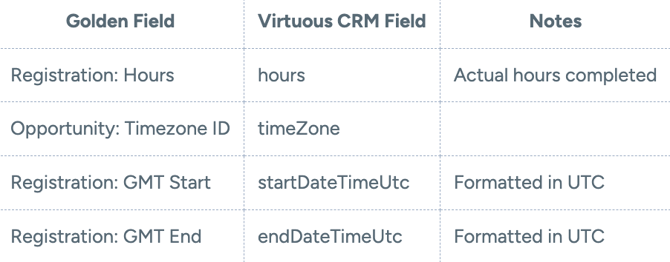
Important: Attendance records are only created for registrations with status = Completed.
Integration Behavior
Contact Linking:
- Participants are linked to Volunteer Opportunities using their contactIndividualId
- The system automatically creates or updates contacts before creating Volunteer records
- Integration data is stored on participants by organization and timeslot for tracking
Opportunity Management:
- Each timeslot creates a separate Volunteer Opportunity in Virtuous
- The system checks if opportunities still exist in Virtuous before updating
- Deleted opportunities are recreated automatically if needed
Webhooks:
- When "Import New Contacts" is enabled, Golden creates a webhook in Virtuous to sync contact updates
- Webhook receives contactCreate and contactUpdate events
Questions? Please reach out to support@goldenvolunteer.com.